
6 Common Time Management Problems and How to Solve Them
Learn how to identify and solve six common time management problems, from constant interruptions and procrastination to poor prioritization and overcommitting. Discover practical strategies and how TruTimer helps teams track work hours, manage tasks, improve productivity, and meet deadlines.

Table of Contents (11 sections)
- What Are Time Management Problems?
- 6 Common Time Management Problems and How to Fix Them
- Problem 1: Constant Interruptions Break Focus
- Problem 2: Everything Feels Equally Urgent
- Problem 3: Procrastinating While Handling Complex Tasks
- Problem 4: Multitasking and Constant Context Switching
- Problem 5: Overcommitting and Guessing at Estimates
- Problem 6: No Reliable Record of Where Time Goes
- Which Time Management Problems to Fix First: A Quick Decision Guide
- How TruTimer Helps Solve Time Management Problems
- Frequently Asked Questions
Time management problems become far easier to fix once teams can see where their hours go, and data suggests the fix is overdue. Gallup's State of the Global Workplace 2026 report found that global employee engagement slipped to 20% in 2025, the lowest level since 2020. Another way of saying this is that attention and energy are scarcer than they were a few years ago, and scarce attention magnifies every flaw in a schedule.
This guide covers six common time management problems, explains why each one happens, and offers solutions for time management problems that prove effective in regular workplaces, from remote product teams to agencies. Every fix is small enough to try this week and measurable in practice.

What Are Time Management Problems?
Time management problems are recurring habits, systems, or workplace conditions that get in the way of productive work. They can range from personal behaviors, such as procrastination to poorly designed workflows, such as meeting overload or cumbersome reporting processes.
Most time management issues fall into one of two groups: habits that a person can work on to improve and problems that require managerial actions. Getting the cause right makes finding a solution simpler. Addressing a team-wide problem as an individual issue rarely works, while changing team processes to fix one person's habits can create unnecessary frustration.
Time management challenges also vary by role, since developers lose hours to context switching, agency staff lose hours to scope drift, and operations teams lose hours to manual reporting. Identifying the type of problem your team faces makes it easier to choose the right solution.
6 Common Time Management Problems and How to Fix Them
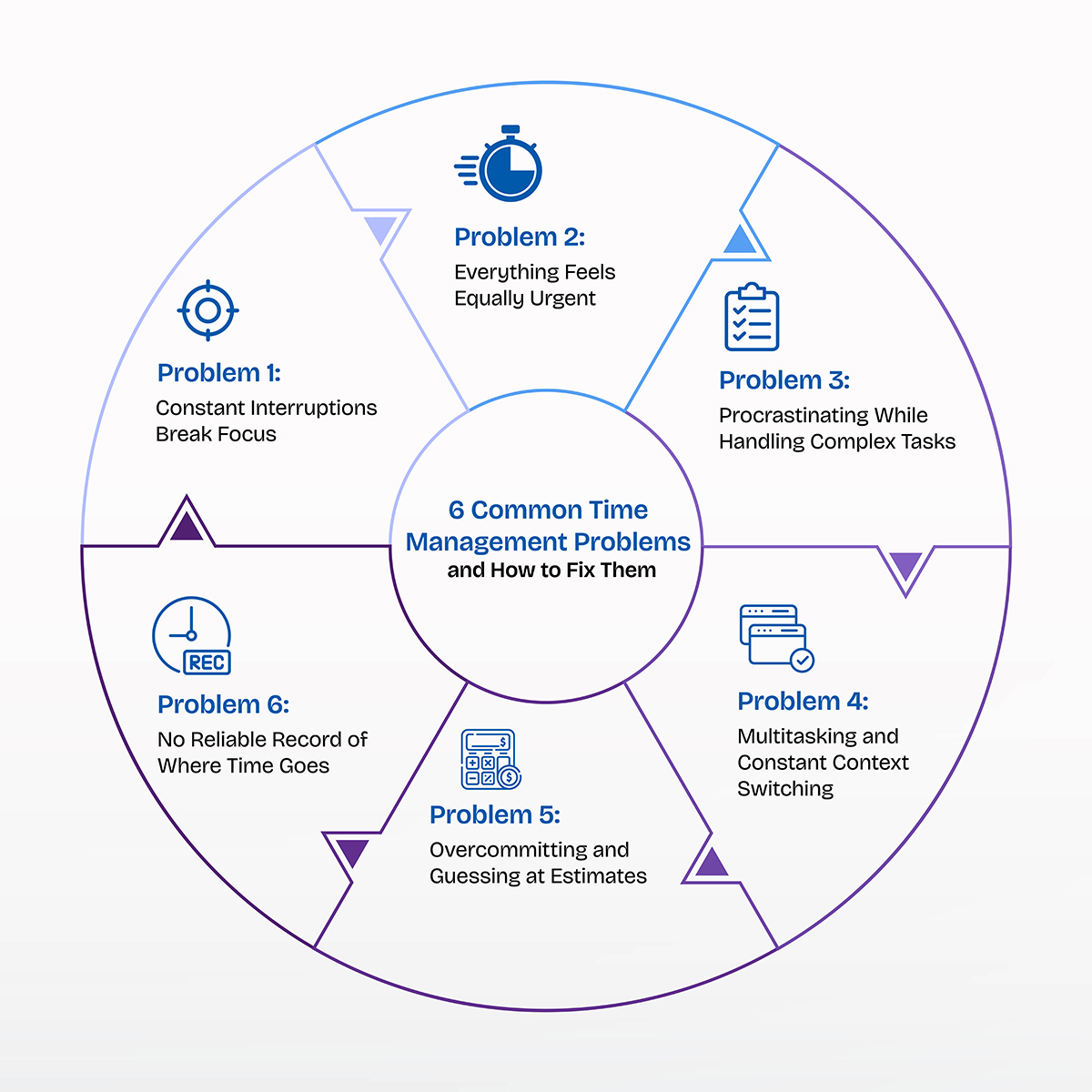
Each problem below shares a common pattern: what it looks like, why it happens, and what to do about it. The order runs from the most visible time management problems to the hard-to-identify ones.
Problem 1: Constant Interruptions Break Focus
Interruptions rank among the most common time management problems because every email, team notification or an interruption from a colleague pulls attention away from the task in progress.
Microsoft's 2025 Work Trend Index report found that workers receive a meeting invite, email, or notification roughly every two minutes during core hours, including an average of 117 emails and 153 Teams messages a day. These numbers count digital prompts, not confirmed task switches, so the numbers may change each day. The cost still adds up.
Research by Gloria Mark at the University of California, Irvine, found that interrupted workers needed an average of 23 minutes and 15 seconds to return to the original task, usually after handling about two other tasks first.
For a team, that means a handful of interruptions can swallow a whole morning of real progress.
Solution:
Among time management issues, interruptions are the easiest to spot and the hardest to fix. The most dependable remedy is scheduling a set of working windows when you only focus on work. Two blocks of 90 minutes a day, with chat muted and the status set to away, give an employee enough scope to focus on intensive work.
Teams can pair that habit with the Channel Contract, a simple agreement on which channel carries urgent requests and how quickly each channel expects a reply. A chat message then doesn’t seem like a fire alarm anymore, and a mail retains its sense of urgency.
However, interruptions relevant to the task at hand can actually help a worker. A colleague who can resolve a query related to the project you’re working on, can save you hours of work which you can use to focus on elsewhere. The goal is to reduce unrelated messages and notifications instead of stopping a worker from regular interactions.
Setting clear team communication rules can often prove more effective than forcing employees to deal with every distraction on their own. This approach can work fine in both open-plan offices and remote workplaces. Try it out to limit interruptions at work.
Problem 2: Everything Feels Equally Urgent
Have you ever felt like scratching your head in confusion to choose the most important task among a list of assignments?
If yes, then scroll further down to explore how to tackle given these prevailing conditions.
Unclear priorities turn a manageable workload into a pile of tasks that makes all of them seem of equal importance. It leads to time management problems as a worker’s calendar looks hectic and scheduling time for the tasks that truly carry weight becomes difficult or delayed.
A team can stay occupied all week without any beneficial progress in a project. Lack of a common goal and clear idea of which workflow holds the most importance can be blamed for this condition. And if it’s not redressed at the earliest, the team loses valuable work hours and struggles with severe time management problems.
Solution:
TruTimer, a time tracking software and productivity tool can be the perfect solution for time management problems. It lets managers and supervisors set the priority of every task. The priority options range from high, and immediate to low and normal. So, deciding which assigned work needs to be worked on early on becomes simpler than ever.
The delegator can also offer an estimated time and set a due date for each task at hand. It allows both the manager and the team member to plan their work schedule as per the task priority and date of submission. So, no important project misses the deadline.
Our time-tracking software also ensures your team members do not miss the task updates. Every time a work is assigned, the assignee receives a mail notifying them the task details. So, there’s no risk of falling behind on updates.
Problem 3: Procrastinating While Handling Complex Tasks
Who wants to start immediately when there’s a week of time in hand? Not workers!
A survey carried out in U.S. workplaces showed that 88% of employees procrastinatewhen an assigned task is not required to submit immediately.
Procrastination is usually a sign that a task feels massive in scope, poorly specified or risk-prone. Do not make the mistake of considering procrastination as synonymous with laziness or a lack of discipline.
Employees can spend hours clearing emails and organising files while postponing important work, such as budget reviews, preparing technical documents, and working on client proposals. This is a common time-management problem for both managers and employees because it delays high-priority tasks that could deliver significant business results.
Solution:
If working on an extensive task seems enervating, why not structure the work into phases?
Just breaking the task into several steps where each step takes 30 to 90 minutes to finish removes most of the dread. A ten-minute starter timer helps with the first step, since the hardest part of most tasks is the first few minutes.
Placing the hardest task in the first focus window of the day also works well, because energy and calendar space are both most available before lunch. Splitting suits tasks that feel large because they are new, while delegation suits tasks that feel large because someone else has the essential details.
Small steps often help a task appear less strenuous which makes employees work on it without constantly worrying about messing up as one complete piece of a resource-intensive task often exaggerates the perceived enormity of the work.
Problem 4: Multitasking and Constant Context Switching
Imagine a customer support representative manages multiple conversations while checking client account details and documenting issues. Do you think it’s feasible to continue like this day after day?
While multitasking feels efficient, it forces the brain to reload context every time attention shifts, which slows each task the person is working on. A study found that the professionals observed worked across about 12 different areas each day, switching between them roughly every 10 minutes. With such frequent changes, they had little uninterrupted time to concentrate deeply on a problem.
Harvard Business Review later reported that knowledge workers toggle between apps and websites nearly 1,200 times a day. Sounds astonishing, right?
Context switching may be the most overlooked of all time management problems, since managers and workers often witness it as an inevitable part of work life. But, it leaves behind its signs that eventually surface.
Solution:
One of the most effective solutions for time management problems is scheduling a time for similar work. Keep 15 minutes at the beginning and end of a day to check and reply to the mails received. Keep an hour in a day to send project or task approvals. Keep an hour or two aside to prepare social media posts. Keep 30 minutes fixed at the middle of the day to check analytics and prepare reports.
However, do not consider batching as the ultimate measure of success as this method of working does not suit every role. Support teams and on-call engineers are required to respond quickly, so for them batching might not be suitable. They should work on queries as they arrive. These time management problems get handled the best way possible when teams limit how many tasks employees handle at once. Relying on self-discipline alone doesn’t protect workers from task overload.
Problem 5: Overcommitting and Guessing at Estimates
You must have faced a situation where a task is assigned on Monday with a promise of delivering on Wednesday and on the day of delivery you notice more than half of the work is still left incomplete.
Overcommitting like this becomes one of the most common time management problems when estimates aren’t relied on past project data. So, deadlines get promised before anyone checks capacity.
Gallup's 2026 report attributed the recent drop in global employee engagement largely to managers, whose engagement fell from 27% to 22% between 2024 and 2025, and a manager who struggles hard to meet too many commitments has little room to direct attention to making the best of anyone else's time.
For teams, the lesson in such a situation is that overloaded schedules produce the same time management issues on repeat: late work, rushed work, and eventually burnout.
Solution:
The simplest solution to fix the situation relies on estimating deadlines or a worker’s capacity from past results. A team that logged hours against similar projects can compare each primary estimate with the actual time required to get the job done and price the next job accordingly.
TruTimer can also work fine in this situation. The software lets you go back to past tasks and check how much time workers needed to get done with similar tasks. So, you can quote prices based on the hours a team or an individual will need to finish a task.
Adding review and revision time to every estimate helps as well, since those phases are the ones most often forgotten. A quick Capacity Check before saying yes to a deadline or due date keeps the calendar workable: does the time exist, does the skill fit, and does the request match a current goal? You can access all the information on TruTimer as it lists down every task with estimated time and due date.
If you find your team is booked with tasks for the day, the polite and professional response is to extend the date to complete the task efficiently.
Scope creep necessitates transparency. Logging every extra request as a separate task, with its own time entry, gives agencies and IT services firms evidence for a change order when small tasks pile up over a quarter. TruTimer also lets you do so. Amazing, right? This clean record turns an awkward negotiation into a quick, factual conversation, and it ranks high among time management challenges for any team that bills by the hour.
Problem 6: No Reliable Record of Where Time Goes
Without a reliable record of where hours go, every discussion of time management problems turns into a debate without concrete evidence to present. Timesheets completed at the end of the week often lack accurate time records. This can make it difficult to identify where working hours are lost, including no track of unplanned meetings, delays in handing work between teams, and minor requests that go unrecorded.
For nonexempt employees, accurate records of billable hours also carry legal weight, since the Fair Labor Standards Act requires employers to keep records of hours worked.
Solution:
TruTimer is an easy-to-use tool to fix the situation. This time-tracking and productivity software tracks every billable hour to maintain clarity in tasks. Spending a few minutes on task tracking and employee tracking sections of the software gives managers insights into which team member is working on which task on which date and how much time they are spending to complete the task at hand.
The software gives data-driven insights into whether a worker has met the due date, whether they have consumed extra hours or fewer hours than the time assigned to complete a task, whether they are working on a normal task or a high-priority one.
Managers can also check the type of task that the team is working on, top active users, how many tasks one has completed and the total work hours in a week. From team level to individual level, the tool sheds light on granular data to maintain the highest level of transparency.
Which Time Management Problems to Fix First: A Quick Decision Guide
When a team is dealing with so many time management problems and is looking for effective solutions to put things right, finding the ideal solutions for time management problems is a pressing need.
Trying to repair everything at once never works, because it only puzzles employees and managers alike and patience runs thin when the team is under immense stress of extensive workload. A better solution to sort things out is focusing your attention on the time management challenges that disrupt the day most, since fixing that one practice frees up hours for the next fix. It works like triage for a schedule, where the glaring problem gets treated first and the minor ones wait their turn.
Let’s check out the table below to explore the best first move as per the issue you’re dealing with:
| Symptom | Issue | Best first move |
|---|---|---|
| Real work happens after hours because days fill with disruptions | Interruptions | Set focus windows and agree on a channel contract to decide which mode of communication requires immediate attention, and which one can wait |
| Everyone is busy, yet key deliverables slip | Unclear priorities | Rank tasks by urgency and business impact, then use TruTimer to track the time spent on priority work and identify where effort is going. |
| A large task has sat untouched for days | Procrastination | Split it into 30 to 90 minute long steps |
| Many tasks remain unfinished and take longer to complete | Context switching | Batch similar work and cap work in progress |
| Deadlines slip right after new commitments | Overcommitting | Review current workloads before accepting new tasks, then use TruTimer to track time spent and assess whether the team has capacity for additional work. |
| Invoices or reports trigger disputes | No time record | Record work hours as tasks are completed and use TruTimer's time reports to support accurate billing and reporting. |

How TruTimer Helps Solve Time Management Problems
TruTimer (a time tracking software) helps solve time management problems by turning mere assumptions into visible records: it logs when work happens, ties each hour to a project or task, and reports where time leaked. As your team focuses on getting the job done well, TruTimer silently works in the background and automatically tracks the hours and activities.
Idle detection distinguishes active work from inactive periods. Task and project mapping connects tracked hours to tasks or tickets in tools like Jira, Azure DevOps, Redmine, GitHub, and GitLab. Timesheets are then generated automatically, eliminating the last-minute rush on Fridays. Offline tracking keeps field crews and off-site workers covered when connectivity drops, then syncs once they reconnect.
Transparent TruTimer reports do the heavy lifting to solve time management problems. Utilization and active-versus-idle views show where focus time disappears, project drift reports reveal which commitments are slipping while there is still time to act, and a Resource Pool view shows spare capacity across teams before you say ‘yes’ to another task.
These views give managers solutions for time management problems that rely on evidence, and they surface time management issues earlier and make time management challenges easier to discuss without blame.
Teams ready to see where their hours really go can schedule a TruTimer demo for a quick walkthrough or start a free trial and track the first week of work as it happens.
Frequently Asked Questions
How long does it take to build a new time management habit?
Research by Phillippa Lally and her colleagues at University College London found that on an average a person requires to do the same task 66 days to form a habit. However, the time to form a habit can range from 18 to 254 days.
The time needed depends on the person and the habit. Teams looking for solutions for time management problems can simply continue their work using TruTimer to gain better insight into how they’re using their time and where improvement is due.
What is the Pomodoro Technique, and does it suit office teams?
We’ve already talked about how constant interruptions during work slow down workers. To battle the disruptions, Pomodoro technique can be ideal.
The Pomodoro Technique alternates 25 minutes of focused work with a five-minute break and adds a long break (20 to 30 minutes long) after four rounds. If your work requires steady concentration, such as writing or code review, it might work the best, but if your role necessitates immediate responses, such as live customer support, it might not be right for you.
What is time blocking, and how does it differ from a to-do list?
Time blocking means setting aside specific times on your calendar for each task, while a to-do list simply records what needs to be done. It simply helps workers focus on one task at a time instead of juggling too many responsibilities at once.
Since the day has 8 hours to get your job done, time blocking helps you see when you have too much work planned and helps you avoid common time management challenges.
How can remote and hybrid teams manage time across different time zones?
Time management problems are the most common for distributed teams as they work following separate time zones. But fixing the situation only requires a team to plan the day with purpose.
The best solution to sort things out is scheduling live conversation, meeting or co-ordinating tasks during the time overlapped. Teams can work on individual tasks when the time is non-overlapping.
How can a team cut meetings without hurting collaboration?
Meeting overload is one of the most common time management problems that a short audit can solve in no time. Each recurring meeting needs a clear purpose, an agenda, and a person responsible to keep it on track. If a meeting lacks any of these, it’s best to simply turn it into a mail. Shortening meetings from 30 to 25 minutes or from 60 to 50 minutes also leaves time between calls to review notes and prepare for the next task.
How should a manager respond when a team member keeps missing deadlines?
A short one-to-one conversation between the team member and the manager should be a priority to identify the reason behind missed deadlines. How much workload they’re handling, the priority of the task they’re dealing with and any problems slowing down their work - knowing these details give a clear picture into the possible blockers.
Time data can show whether the cause is overload, unclear priorities, or underestimated tasks, which points to the right fix and keeps the discussion factual. Many time management issues of this kind turn out to be planning problems rather than low effort on the worker’s side.