
The Day Your Team Found Out You Installed Monitoring Software
Learn how employees may react to workplace monitoring software and why transparency, trust, and clear communication matter.
It's 11:40 on Tuesday morning. One of your senior developers opens Task Manager to kill a Node process that has his laptop fan screaming. Between the browser and the build tools, he finds a process he doesn't recognise.
He searches the name. The first result is a monitoring vendor's product page. He sits with that for a moment.
Then he screenshots the process list - not his code, the process list. He posts it in the WhatsApp group that has no managers in it, with one line: "check your task manager."
You don't know any of this is happening. IT pushed the agent overnight, exactly as you asked. As far as you can tell, the rollout is going fine.
In the IT services sector, the operational strategy chosen for deploying workforce management directly influences voluntary turnover, corporate culture and organizational trust.
Installing employee monitoring agents without any prior communication routinely triggers reduced management, internal disruption and elevated attrition, regardless of how legitimate the underlying business justification may be.
This analysis evaluates two distinct deployment models for a 40-to-200-person service organization – disclosure first, open-rollout versus a silent background installation.
It tests the measurable morale impacts, operational consequences and legal compliance considerations under India’s Digital Personal Data Protection Act, 2023.
Key takeaways
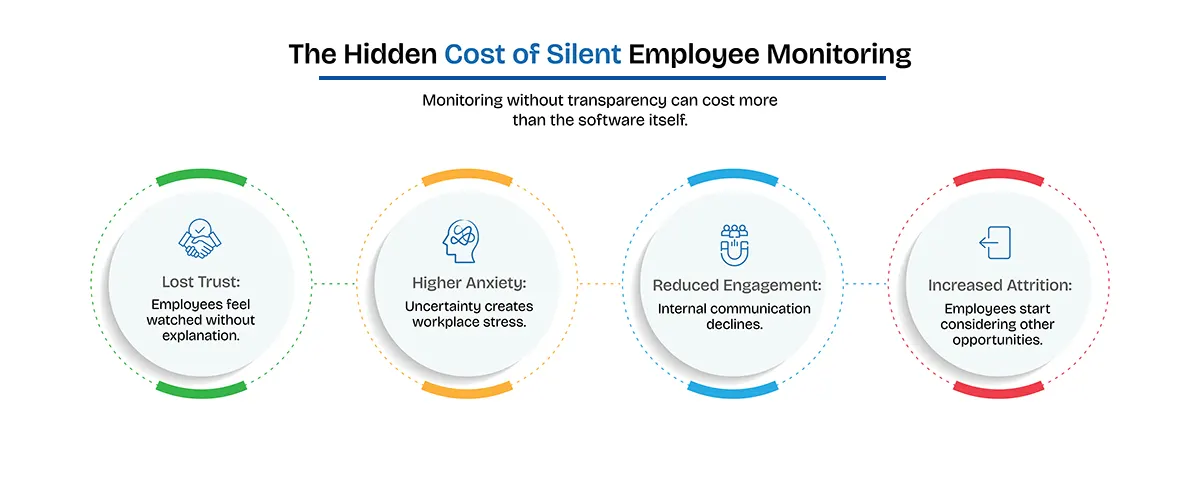
- The silent signal – Absence of quick feedback following an unannounced rollout does not indicate acceptance but often reflects passive disagreement and proactive job seeking.
- Low barrier mitigation – A transparent implementation needs minimal operational effort, a 25-minute briefing and a single-page notice detailing data capture parameters, access permissions, exclusions and individual access rights.
- Attrition metrics – Monitored employees report an intent-to-leave rate nearly double that of unmonitored peers 42% vs 23% within a 12-month period (Worklytics). In India’s IT services market, where baselines attrition averages 13% to 16% this variance represents a direct line-item expense.
- Workplace impact benchmarks – Industry research shows that while 78% of the enterprises use workforce monitoring, 72% of employees report it does not enhance productivity, and 59% experience heightened anxiety as a result (FM Magazine, Dec 2025; Worklytics)
- The discovery effect – Organizational pushback is rarely directed at the software itself; rather stems from employees discovering tracking agents second-hand without managerial disclosure.
What actually happens when you roll it out silently?
12:15pm. The screenshot has left the no-managers group and reached two more. Someone finds the vendor's feature page, and now the team is reading a marketing site that lists everything the agent can capture - screens, apps, websites, activity. Nobody knows which of those switches you actually turned on. So they assume all of them. By lunch, the quietest person on your delivery team has read the word "screenshots" eleven times and typed nothing anywhere.
1:00pm standup. Answers get shorter. The channel that usually argues about lunch orders posts nothing for three hours. Two people who normally leave their personal phones face-down start taking calls in the stairwell.
5:30pm. A calendar invite lands from the engineer you can least afford to lose. Title: "Quick chat." Tomorrow, 10am. No agenda. You've hired enough people to know exactly what a no-agenda quick chat the day after a surprise is. You will spend tonight drafting answers to a conversation that hasn't happened yet.
Here is the cruel part: your reasons were good. A client disputed an invoice last quarter, and you had nothing to stand on. You weren't trying to catch anyone. But nobody heard your reasons, because you never said them - the tool spoke first. And a tool that arrives unannounced only ever says one thing: we don't trust you.
When software agents are silently deployed overnight, discovery inevitably occurs via system monitoring utilities like Task manager. In the absence of official context:
- Escalating turnover – The absence of upfront communication converts valid operational motives like resolving client billing disputes into perceived organizational distrust.
- Productivity drop – Engagement in internal communication channels drops as trust degrades, while job-seeking activities increase.
- Uncontrolled speculation – Staff members cross-reference vendor feature lists online, assuming all potential tracking mechanisms – including keystroke logging, continuous screen capture and ambient recording have been activated.
72% of the people it watches say it isn't buying you output, while 59% of them are paying for it in stress (FM Magazine, Dec 2025 · Worklytics).
Now put the leave-intent gap on your own headcount. Illustrative math, 60 people: at the monitored rate, ~25 of them plan to be gone within a year; at the unmonitored rate, ~14. That's eleven extra resignation conversations - in an Indian IT services market where attrition already runs around 13–16% and every senior exit stalls a client project. Whatever the tool costs per seat, that is not the bill. The bill is the eleven.
And here is what makes the whole thing avoidable: the resentment isn't really priced against monitoring. It's priced against surprise. The difference between a tool that watches people and a tool that records work - and why one drains a team while the other doesn't - is its own article: employee monitoring vs time tracking (planned). The short version is that the same agent, rolled out with its purpose stated and its limits shown, lands as a different product.
What does the same day look like done in the open?
Rewind to 9:00am, same Tuesday. Nothing is installed yet.
You book 25 minutes with everyone and you go first: "Last quarter a client disputed an invoice for 340 hours and we had nothing to show them. That can't happen again, so from Thursday we're tracking time on client work. Here is exactly what that means." Then you put the list on the screen - the capture types, one by one, including the ones you turned off. The room is not delighted. But the second question is "can it read what I type?", and you answer it in one sentence, without checking with IT, because you knew the answer before you bought the tool. Somewhere in the room, shoulders come down an inch.
An open rollout establishes clear operational parameters prior to software installation:
- Data transparency – Employees retain visibility over their own telemetry data, converting the tool from an oversight mechanism into a shared record of verified output.
- Defined operational scope – The enterprise offers an itemized list detailing active capture features alongside explicit exclusions (e.g., personal device monitoring and disabling keystroke logging)
- Contextual framing – Management explicitly defines the business driver.
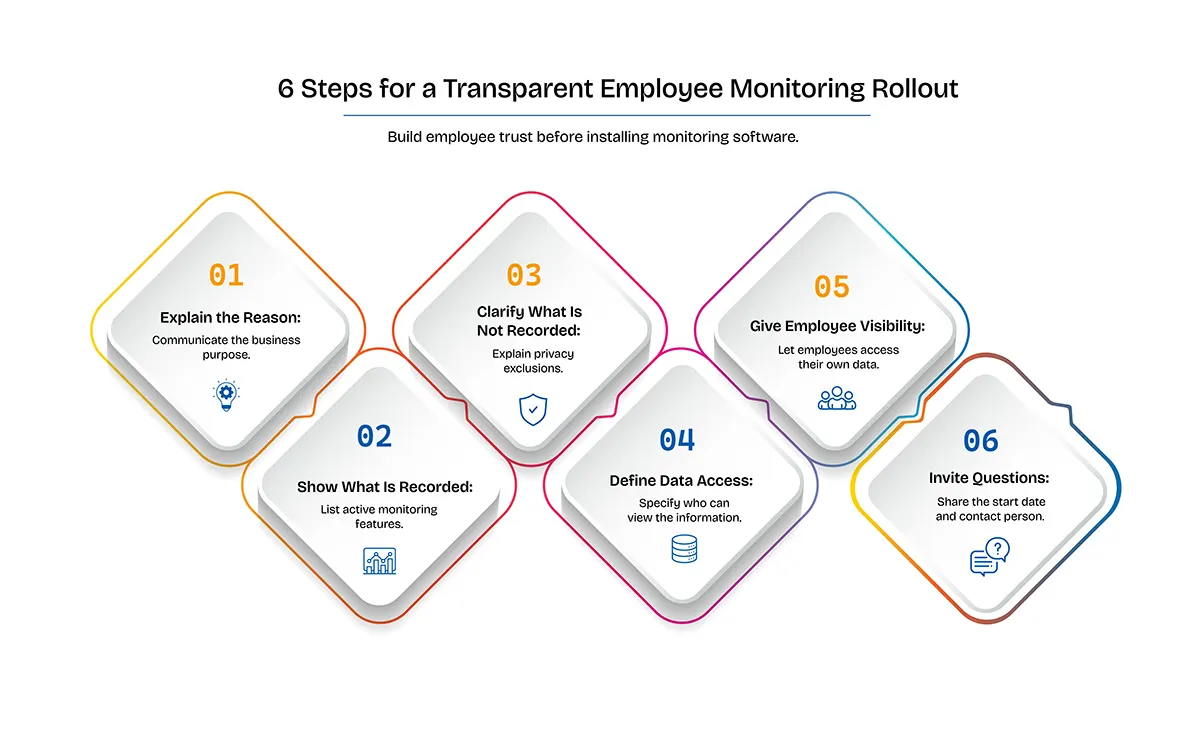
The announcement that makes the difference fits on one page:
1. The reason, in one sentence. A billing dispute, a client audit requirement, capacity planning for the next hire - a business reason, stated plainly. "To improve productivity" is not a reason; it's an accusation wearing a lanyard.
2. Exactly what it records. Name every capture type you enabled: tracked time on tasks, app and window usage, activity counts, periodic screenshots. If you can't list them, you're not ready to roll out.
3. Exactly what it never records. What you type, webcams, personal devices, anything outside a running work session. The "never" list does more for the room than the "what" list.
Who sees it, and what it's used for. Invoicing and planning - and who specifically has access. Not a leaderboard, not a stick for 1:1s.
Where each person sees their own data. The same numbers a manager sees - their time, their activity - visible to them, so nothing is being said about anyone behind their back.
When it starts, and who to ask. A named person, before Thursday, no question too small.
Notice what this costs: one meeting, one page. And notice what it removes: there is nothing left to discover. On Thursday the process shows up in Task Manager and it is old news. The WhatsApp moment - the actual detonation in version one - simply never happens, because a thing you were told about on Tuesday cannot be a scandal on Thursday.
One more reason to do it this way, beyond decency: Indian law is moving in the same direction. Consent buried in an offer letter is exactly the mechanism now under legal fire, and disclosure-first is the posture the DPDP Act rewards. We covered what's actually legal - and the penalty tiers most articles misquote - in Is employee monitoring legal in India?.
Operational cost and measurable morale
| Operational Indicator | Metric benchmark | Analysis/impact | Source |
|---|---|---|---|
| Enterprise adoption | 78% of the surveyed companies | High baseline market prevalence | FM Magazine (Dec 2025)/Worklytics |
| Perceived productivity value | 72% report no improvement | Misalignment between actual output and data capture | FM Magazine (Dec 2025)/Worklytics |
| Reported anxiety and stress | 59% of monitored workers | Negative impact on workplace mental health | FM Magazine (Dec 2025)/Worklytics |
| 12-month intent to leave | 42% (monitored) - vs 23% (unmonitored) | Significant attrition risk in competitive talent markets | Worklytics |
Where does TruTimer sit in all this?
For transparency: this blog is written by the team behind TruTimer, and the announcement list above is easier to deliver honestly with some tools than others. Our desktop tracker records mouse and keyboard counts - that someone was typing, never what they typed - so item 3's biggest promise holds by design rather than by policy. Screenshots, activity counters and app/window tracking are each separate edition features, so the capture list you read out can exactly match what the software does; screenshots, where enabled, fire at a random moment inside bounds an admin sets, and that's disclosed, not hidden. For field teams, live location is off by default, and when it's on the person sees a "Live location tracking is active" banner. Each person can open their own activity and tracked time - the same figures a manager sees. And when the system spots signs of strain, the nudge goes to the person first; a lead only hears about it if that person chooses to ask for help.
None of that runs your rollout for you - the meeting and the one-pager are still your job, and no vendor can do them for you. And if what you actually need is covert capture or full screen review - some regulated environments genuinely require it - we are deliberately not that product, and you should choose accordingly. Pricing is public, in INR.
What does week four feel like in each version?
The silent version. The channel never got loud again. Standups run four minutes. Your strongest engineer's "quick chat" turned into a notice period, and his exit interview contains the sentence you'll think about for a year: "It wasn't the tracking. It was finding out from Task Manager." Two people you'll never identify now move their mouse when they get up for chai. The dashboard is full of data and you trust it less every day, because you've taught your team that the numbers are a weapon - so now the numbers are performed.
The announced version. Week four, Friday 1:1. A developer you were mildly worried about opens her own activity view before you can open yours. "Rough week on the Nexus project - you can see Tuesday was all firefighting. I want Friday afternoons for the refactor." She is using the tracking data to argue her case, unprompted, with the same numbers you have. That is the whole shift, in one sentence: the tool has stopped being something done to her and started being the record that backs her up. And when the client emails asking for an hours breakdown, nobody's stomach drops - the record was already there, and everyone knew it was being kept.
Same software. Same Tuesday. The only variable was who told the team - you, or Task Manager.
We're writing the full playbook version of the announced rollout - the meeting script, the notice one-pager, the 30-day sequence - as How to roll out time tracking in 30 days without losing anyone (planned). If you'd rather talk a rollout through with a person first, we do that.
Frequently asked questions
Should I tell my employees before installing monitoring software?
Yes - before, not after. The research shows the damage comes from surveillance experienced as distrust: 59% of monitored workers report stress and anxiety, and monitored employees plan to leave at 42% vs 23% for unmonitored peers (FM Magazine, Dec 2025 · Worklytics). Disclosure first is also the posture Indian data-protection law increasingly expects.
How do I introduce employee monitoring to my team without backlash?
Announce it before anything is installed, in person. State the business reason in one sentence, list every capture type you enabled, list what is never captured, name who sees the data and why, and show people where to see their own data. Then leave room for questions with a named owner.
What should a time tracking announcement actually include?
Six things: the reason, the exact capture list, the never-captured list, who has access and for what, where each person views their own data, and the start date with a contact for questions. If any of the six is missing, the team fills the gap with the worst version.
Will employees quit over monitoring?
Some will. Monitored employees plan to leave within a year at 42%, against 23% of unmonitored peers (Worklytics). Whether disclosure narrows that gap isn't measured in these studies - but in every botched rollout the resentment attaches to surprise and asymmetry, which argues for announcing first and capturing less.
Is it legal in India to monitor employees without telling them?
Undisclosed monitoring is where the legal risk concentrates. India's DPDP Act requires notice and a valid basis for processing employee data, and commentary argues consent buried in an offer letter may not count at all. Full employer compliance lands 13 May 2027 - the details are in our plain-English guide.
The legal points above are commentary, not legal advice - consult a lawyer for your specific situation. Statistics re-verified at each refresh; last on the dateModified shown above.
Sources: FM Magazine - How AI is changing the way companies watch workers, Dec 2025 · Worklytics - How employee tracking hurts morale and productivity