

Everything You Need to
Track, Prove, and Plan
Desktop, mobile, web and REST API — one login, one source of truth, tracking time against the work items your team already uses. No gaps when work moves between tools, no second timesheet to reconcile.
No credit card · Keep your Jira · Cancel anytime
Built for the way modern service teams already work
Track From
Anywhere You Work
Desktop, mobile, web or REST API — same data, same login, no gaps when work moves between them.

Desktop Apps
Native applications for Windows, macOS, and Linux with offline support and system tray integration.

Mobile Apps
iOS and Android apps with GPS tracking, push notifications, and full feature parity.

Web App
Powerful web application accessible from any modern browser with real-time sync.

REST API
Full-featured REST API with webhooks, OAuth 2.0, and comprehensive documentation.

Field GPS Check-In
Geofence-confirmed check-ins, location logs, and photo, form, or signature submissions from the mobile app — proof for work done on site.

Offline Mode
Continue tracking even without internet connection, with automatic sync when online.
One Click Time Tracking
Start and stop time tracking instantly with a single click—no interruptions, no complexity.
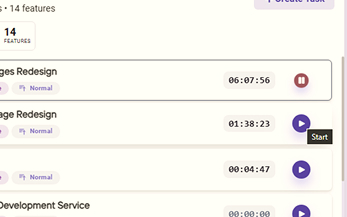
One-Click Timer
Start and stop tracking with a single click from anywhere
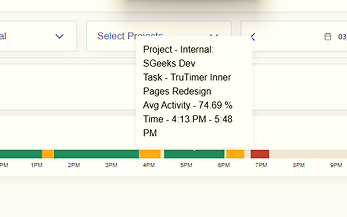
Idle Detection
Automatically pause when you're away and resume when you return

Manual Time Entry
Add or edit time entries for work done offline or in the past
Smart Features for
Accurate Time Tracking
A live dashboard, reports that flag what needs attention, and team controls built on trust — everything you need to turn tracked time into decisions.
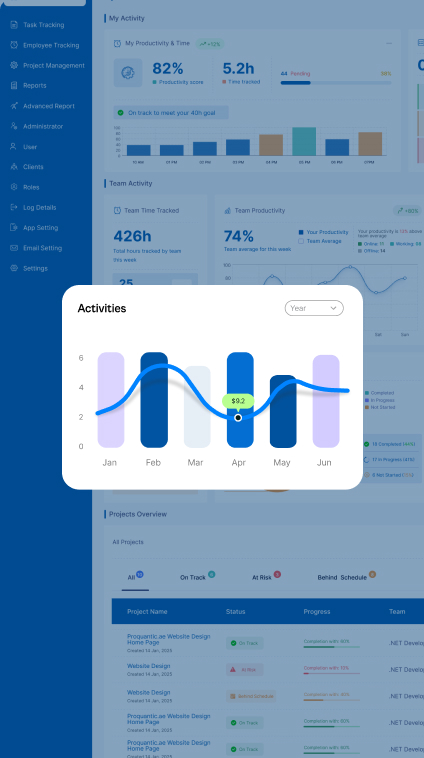
Everything at a glance
Get a complete overview of your team's productivity, project progress, and time allocation. The intuitive dashboard brings all your important metrics together in one place.
- Real-time updates
- Performance Metrics
- Customizable widgets
Reports That Show What to Fix
Turn raw time data into clear next steps. TruTimer surfaces where hours are leaking, which projects are drifting, and where to rebalance workload — so you act on patterns, not hunches.
- Trend & bottleneck detection
- Custom Reports
- Export Anywhere
Support Your Team, Not Surveil It
Give managers the context to help, not police. See workload at a glance, keep roles and access clean, and make sure effort lands on the work that matters. Activity is context for a conversation — never a surveillance score.
- Workload Visibility
- Attendance Tracking
- Role-Based Access
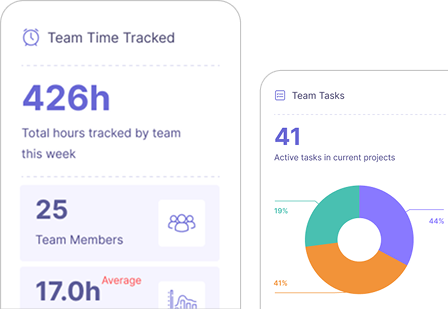
All the Tools and Insights You Need
to Succeed

Effortless Time Tracking
Track time automatically with one-click start/stop and idle detection.

Know Where the Hours Went
See where time goes — and where it slips — across people, projects, and clients.

Team Activity Overview
Monitor team activity and productivity with real-time updates.

Detailed Time Reports
Generate detailed reports and export data for billing and analysis.
Plug Into the Tools You Already Use
Keep the tools your team already lives in. TruTimer runs alongside Jira, Redmine, and Azure DevOps work items — and connects to GitHub and GitLab so branches, commits, and PR/MR status sit right next to the time. No rip-and-replace, no retraining.

Jira
Track time directly on Jira issues and sync work logs automatically.

Redmine
Seamlessly integrate time tracking with your Redmine projects and tasks.

Azure DevOps
Connect with Azure DevOps boards and track time on work items.
GitHub
Attach branches to tasks and see commits and PR status — with auto status-on-merge.
GitLab
Link branches and merge requests to tasks; tasks move forward when an MR merges.

TruTimer Native
Use TruTimer's built-in project management with no external tools needed.
Don't see your tool? Request an integration →
Frequently Asked Questions (FAQs)
Answering your most common queries, one at a time. For everything else, we're just a call away.
How does TruTimer support remote and hybrid teams without micromanaging?
By giving everyone the same source of truth, not by watching keystrokes. Tracking runs in the background and ties hours to tasks and clients automatically, so managers see progress and capacity — never a surveillance score. Team members get private wellness prompts when they're overloaded; whether to escalate is their call.
What are TruTimer's key integrations with common project management tools?
TruTimer integrates seamlessly with popular tools like Jira, Asana, Trello, Monday.com, Slack, and more. These integrations allow automatic time tracking linked to tasks and projects.
How does TruTimer provide verifiable data for client billing and timesheets?
TruTimer captures activity screenshots, app usage data, and precise time logs that serve as verifiable proof of work. This data can be exported for client billing and timesheet reporting.
Does TruTimer compromise employee privacy or damage team trust?
No. TruTimer is built with privacy-first principles. Screenshots and monitoring are optional, configurable by admins, and employees are always aware when tracking is active.
How does TruTimer help us improve team productivity and project profitability?
By providing real-time insights into how time is spent, TruTimer helps identify inefficiencies, optimize resource allocation, and ensure projects stay on budget.
What data security measures does TruTimer have in place to protect our organization's information?
TruTimer encrypts data in transit and at rest, isolates every tenant's data, and secures device access with client certificates and obfuscated payloads. Role-based access controls let you decide exactly who sees what.
Illustrative scenarios
What Teams Want From Time Tracking
That Actually Earns Its Keep
Stop Guessing. Start Proving.
Validate billable hours, cut productivity leakage, and give managers real data instead of assumptions — see TruTimer on your own workflow in a 20-minute walkthrough.
No credit card required · Go live in days · Cancel anytime